Building an SI agent is easier than ever to start and as hard as ever to finish. Model APIs and agent frameworks make a demo an afternoon’s work. Turning that demo into something that runs inside a real business, touches real systems and is trusted by the people whose work it changes is a different project, and most of the effort goes into parts that never appear in the demo.
This is the step-by-step process we follow. It is deliberately unglamorous. Each step exists because skipping it is one of the usual reasons agents get switched off a few weeks after launch.
Step 1: pick one workflow, not "automation"
Start with a single, specific workflow that already exists and that people can describe precisely: triaging inbound tickets, turning a backlog into a sprint plan, reconciling a recurring report, qualifying inbound leads. If nobody can write down how the work is done today, an agent will not discover it for you.
Write the current process down as numbered steps, note where a person makes a judgement call, and mark which systems each step touches. That map tells you which tools the agent will need and where the risk sits.
Good first candidates are repetitive, frequent, judgement-heavy enough that fixed rules break, and low in blast radius when something goes wrong. If the workflow is fully deterministic, plain automation will be more reliable than an agent, and it is worth checking whether you need an agent, a chatbot or automation before you commit.
Our Scrum Gen agent shows the right scope. It turns Jira backlogs into sprint plans and user stories: one kind of input, one kind of output, and a team that knows exactly what good looks like.
What steps turn an SI agent demo into production?
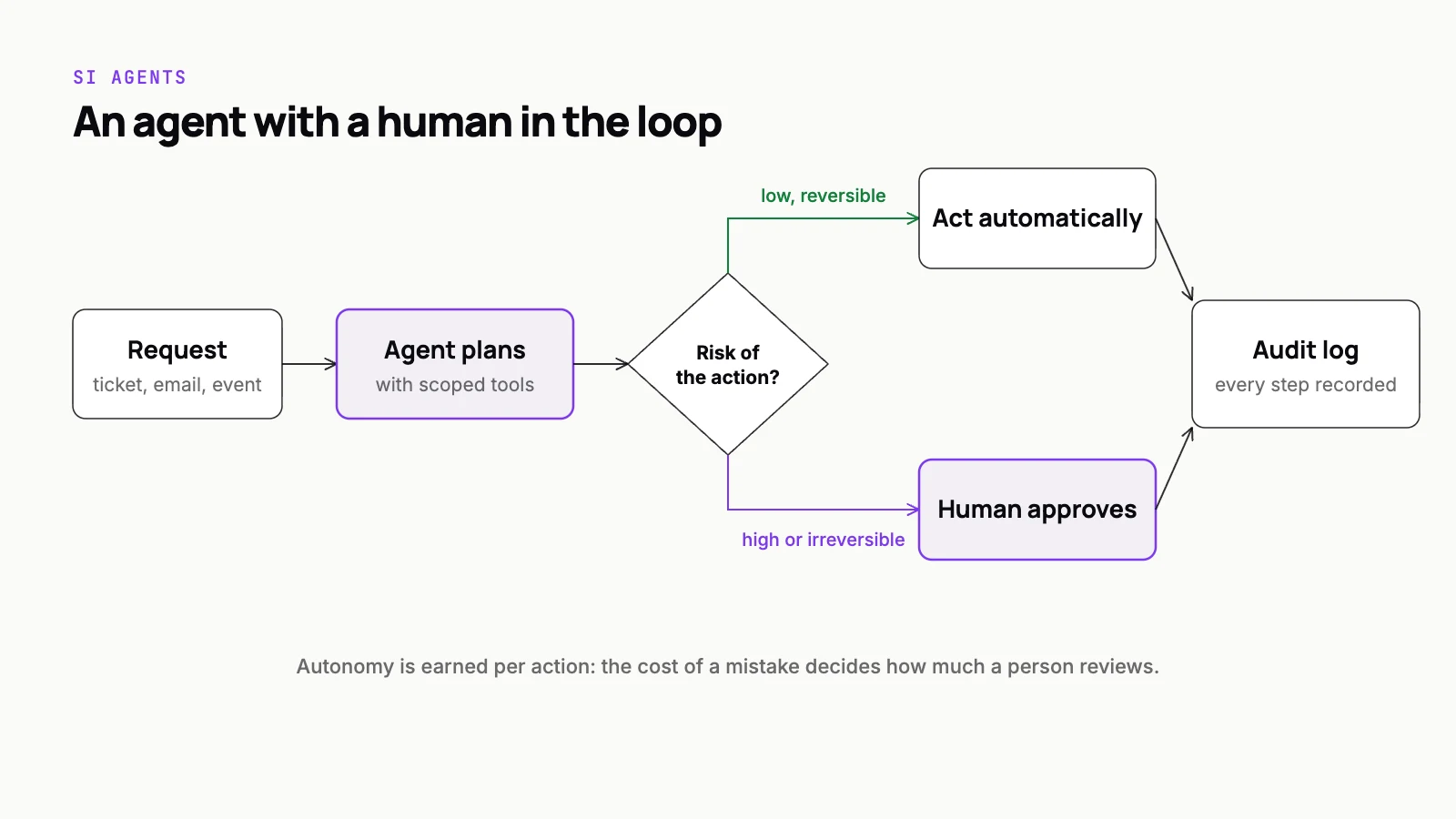
Turning an SI agent demo into a trusted production system is a staged process, and most of the effort goes into parts the demo never shows. Start with one existing workflow that people can write down as numbered steps, such as ticket triage or lead qualification. Define done before writing a prompt: the trigger, the exact output, the quality bar a reviewer would apply, and the hard limits that force a handover. Build narrow, well-described tools with minimum permissions, separate read tools from write tools, and run the agent under its own identity. Place human approvals by risk: reversible drafting runs alone, actions touching customers, payments or production need sign-off, and irreversible actions always do. Build an evaluation set from the workflow's own history that scores tool choice, order, arguments and escalation, not just the final answer. Roll out through shadow, suggest, act with approval, then act alone on proven routine cases. Finally, log every run and treat human overrides as your most valuable signal.
Step 2: define "done" before you write a prompt
An agent without a definition of done will either stop too early or never stop. Write down, in plain language, what a finished run looks like, what a successful outcome is, and what the agent must never do. At minimum, cover these four things:
- The trigger: what starts a run, such as a new ticket, a schedule or a user request.
- The output: the exact artifact or change of state that counts as complete.
- The quality bar: how a human reviewer would judge a result as good, acceptable or wrong.
- The hard limits: actions that are off the table, and the conditions under which the agent must stop and hand over.
This short document becomes the spec for everything that follows: the tools you build, the approvals you need and the evaluation set you score against. It also forces the people who own the workflow to agree on what good means, which is worth doing whether or not you build the agent.
Step 3: tools and permissions, scoped to the job
Each tool should be a narrow, well-described function (look up a customer, create a draft reply, update a ticket status), not a general-purpose door into your systems such as raw database access or an unrestricted API key. Clear names, typed arguments and precise descriptions matter, because the model chooses tools by reading them.
An agent’s capability is exactly the set of tools you give it. Scope the tools and you have scoped the agent.
Give every tool the minimum permission it needs, and run the agent under its own identity so its actions are distinguishable from a human’s in every log. Separate read tools from write tools, and treat every write as something that may need approval. Standards such as the Model Context Protocol make it easier to expose tools consistently across models, but they do not decide scope for you. In the SI agents we build for clients, this tool layer is usually the largest single piece of engineering, and the part that carries over to the next agent.
Step 4: decide where humans approve
Not every action needs a human, and an agent that asks permission for everything is just a slower form. The skill is placing approvals where the risk actually is:
- Reversible, low-impact actions such as drafting, tagging and summarising can run on their own.
- Actions that touch customers, payments or production systems get an approval step until the evidence justifies loosening it.
- Anything irreversible requires explicit human sign-off, always.
- Every escalation reaches a named person or queue, with the context needed to decide quickly.
Our Helio Copilot network-ops agent follows this shape. It triages SIP events and closes routine L1 tickets on its own, escalates what needs a person to human engineers, and keeps an audit trail of everything it did. We go deeper on approval design and audit in agents that don’t go rogue.
Step 5: build the evaluation set
Before tuning prompts or comparing models, collect real examples of the workflow: the input, the correct outcome, and the path a good human took to get there. For agents, score more than the final answer. Check whether it called the right tools, in a sensible order, with valid arguments, and whether it stopped and escalated when it should have. Pull the examples from the workflow’s own history, including the messy ones: incomplete requests, conflicting instructions, cases a senior person would escalate. Agents fail at the edges, so the edges are what the set needs most.
Run the whole set on every change to prompts, tools or models, and add every real failure to it the day you find it. This is the same eval-first discipline we apply to every SI system. For agents it matters even more, because a small change in reasoning can produce a large change in what actually gets done.
Step 6: roll out in stages
Trust is earned in steps, and each step should have an exit criterion written down in advance:
- Shadow: the agent runs on real inputs but only records what it would have done. Compare that with what people did.
- Suggest: it proposes actions inside the tools people already use, and a human accepts or edits each one.
- Act with approval: it executes, with sign-off on anything that matters.
- Act alone on routine cases: only for the categories where the record shows it is reliable, with everything else still escalated.
Moving to the next stage is a decision made on eval scores and review data, not a feeling that it seems to be working. Moving back a stage should be just as easy, and nobody should treat it as a failure.
Step 7: monitor it like a colleague, not a cron job
Agents degrade in ways ordinary software does not. Source data shifts, a provider updates a model, a new type of request starts arriving, or the API behind a tool changes. Monitoring has to catch drift in quality, not just errors and downtime.
Log every run end to end: the input, each tool call and intermediate step, the output and any human decision. Track how often the agent escalates, how often reviewers approve or override it, how often tools fail, and how long runs take. Sample completed runs for human review every week, route anything surprising back into the eval set, and give the agent a kill switch that any owner can pull.
Treat overrides as the most valuable signal you have. Every time a person corrects the agent, you have learned something about the workflow that your definition of done did not capture.
What to build next
Once one agent is trusted in one workflow, the second goes much faster, because the scaffolding carries over: the tool layer, the identity and permission model, the approval queue, the eval harness and the monitoring. That scaffolding is the real asset. The agent itself is the smallest part.
This is how we build agents in our SI applications practice, from scoping the first workflow through to the monitoring that keeps it trustworthy. If you have a workflow in mind and want a second opinion on whether it makes a good first agent, we are glad to talk it through.