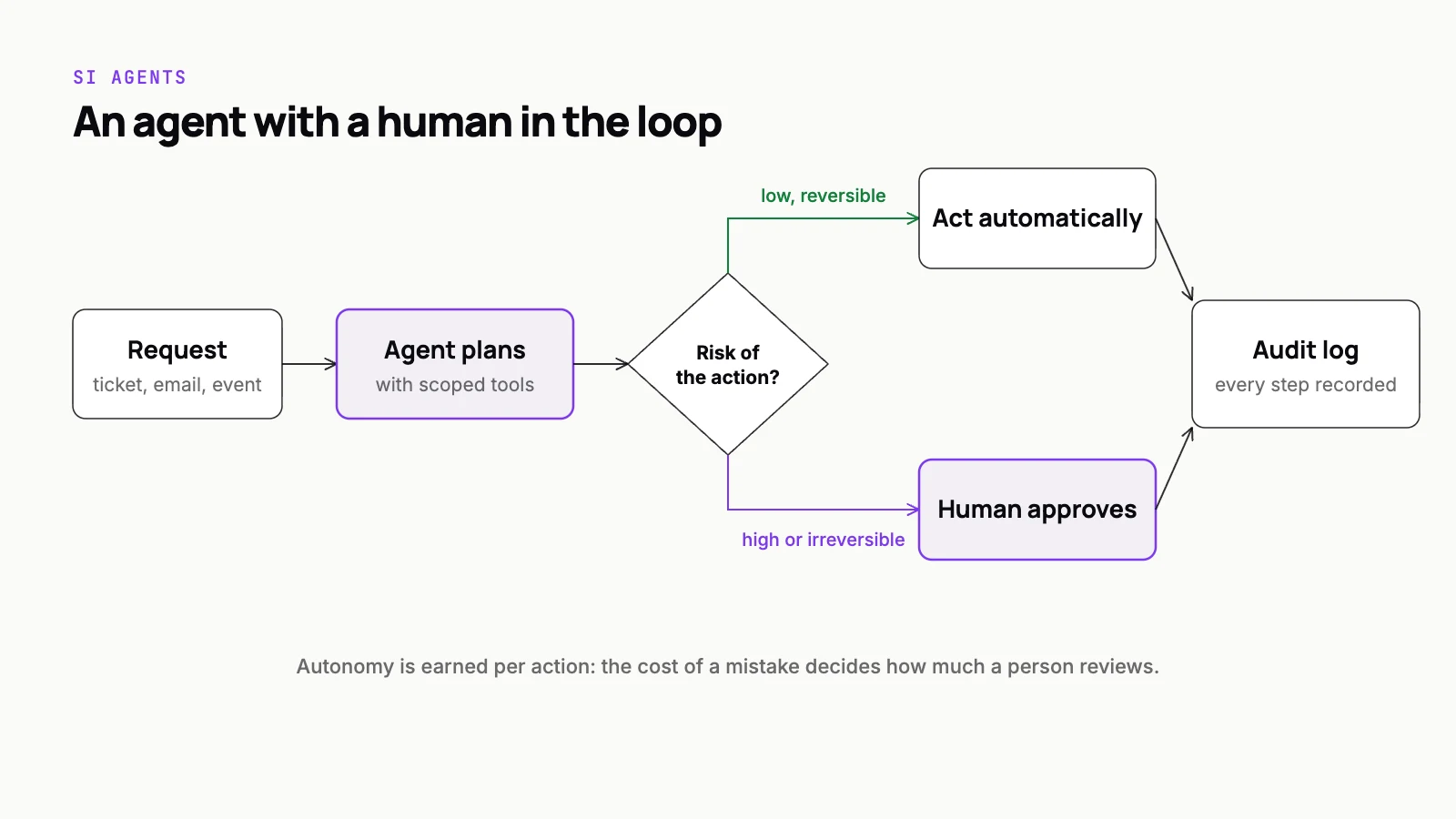
The question with SI agents is rarely whether a human should be involved. It is where, how often, and at what cost to the speed that made the agent worth building. Put a person on every step and you have built an expensive form with extra latency. Put a person on none and you are betting the business on a model never being confidently wrong.
Human-in-the-loop design is how you settle that trade-off on purpose rather than by accident. Below are the approval patterns we use when we build agents for real operations, when each one fits, and the parts teams usually forget: reversibility, the approval screen itself, and the audit trail.
Classify actions, not agents
Before choosing a pattern, list every action the agent can take and sort each one by two questions: how bad is it if this is wrong, and can it be undone? Reading data, drafting a reply and tagging a ticket sit at one end. Sending money, deleting records, emailing a customer and changing access sit at the other.
Oversight belongs to the action, not the agent. The same agent can draft freely, update internal fields with light checks, and need explicit approval before anything leaves the building. When we scope SI applications this list comes first, before a single prompt is written. It is the scoping step we describe in agents that don’t go rogue, and if you are earlier than that, our guide on how to build an SI agent for your business covers the groundwork.
When should a human approve an SI agent's actions?
A human should approve an SI agent's action whenever a mistake would be irreversible, external or financial, and for nearly every action while a new agent is still proving itself. Start by listing each action the agent can take and asking two questions: how bad is it if this is wrong, and can it be undone? Reading data, drafting replies and tagging tickets can run freely. Sending money, deleting records, emailing customers and changing access need approve-before-act, where a person sees the exact email, record change or refund and approves, edits or rejects it. Between those extremes, use confidence thresholds built from several checks (strong retrieval evidence, passed validation rules, a known case category, impact under a set limit) rather than the model's own certainty, batch review for similar high-volume items, and sampling audits once autonomy is granted. Escalations must carry the agent's evidence and reasoning. Rising error rates should move a category back to approval automatically.
Pattern one: approve before act
The agent prepares the action completely and stops. A person sees exactly what will happen (the email as it will be sent, the record as it will be changed, the refund with its amount and recipient) and approves, edits or rejects it. Nothing executes without that decision.
Use it for anything irreversible, external or financial, and for every action in a new agent’s early weeks, until you have evidence of how it behaves. The cost is speed and reviewer attention, so it should not be the permanent setting for low-risk work. Its quiet benefit is data: every approval, edit and rejection is a labelled example of what good looks like.
Pattern two: confidence thresholds and escalation
The agent acts on its own when it is confident and the stakes are low, and escalates to a person otherwise. The hard part is defining confident. A model’s own statement of certainty is not reliable by itself. Better signals combine several checks: did retrieval find strong supporting evidence, did the output pass validation rules, does the case match a known category, is the impact under a set limit.
Escalation must carry context. The reviewer should see what the agent found, what it proposed and why it stopped, so they decide quickly instead of redoing the work. This is the pattern behind Helio Copilot, a network-ops agent that triages SIP events and closes routine L1 tickets itself, escalating what truly needs a human, with audit trails on every step.
Tune thresholds against evaluation data, not intuition, and start strict. Loosening a threshold after weeks of clean results is easy. Recovering trust after a bad autonomous action is not.
Pattern three: batch review
For high-volume, low-urgency work, interrupting a person for each item wastes their attention. Instead the agent prepares a batch (a day of invoice matches, a set of categorised tickets, a list of record updates) and a reviewer approves it as a set, scanning for exceptions and rejecting individual items.
Batch review works when items are similar and errors are cheap to catch before execution. Sort the batch so the least certain items come first, highlight what differs from the usual, and allow approve-all-except. It suits many of the back-office flows we cover in business process automation with SI agents.
Pattern four: sampling audits
Once an agent acts on its own for a category of work, someone still needs to check it keeps doing that work well. Sampling audits review a random slice of completed autonomous actions after the fact, plus a targeted slice of the risky ones: the largest amounts, the newest customer types, the cases closest to the threshold.
The audit is a feedback loop, not a report. Errors it finds go into the evaluation set, and a rising error rate in a category should automatically move that category back to approve-before-act. Sampling is what lets you grant autonomy without granting it forever.
Make actions reversible wherever you can
The cheapest oversight is the ability to undo. Design actions so an agent’s mistakes can be rolled back before they cost anything.
- Soft-delete and archive rather than delete.
- Queue outbound messages with a short delay and a visible cancel option.
- Store the previous state with every change so a revert is one operation.
- Use staging states (proposed, pending) for anything that touches money or customers.
Reversibility changes the economics of oversight. An action that can be undone in one click can often move from approve-before-act to sampling, and that move is where most of the speed gains come from.
Design the approval screen like a product
Approval fatigue is the main way human-in-the-loop fails in practice. If reviewers face a long queue of items that are almost always fine, they stop reading and start clicking.
An approval screen that people click through without reading is not oversight. It is a rubber stamp with a log attached.
Good approval UX fights that directly. Show the proposed action as a clear preview, put the agent’s evidence and reasoning beside it, highlight what is unusual, make edit as easy as approve, and ask for a short reason on rejection so the feedback is usable. Route each approval to the person with the authority and context to judge it, and watch review times: approvals that happen faster than anyone could read are a warning sign.
Keep an audit trail you can actually use
Every agent action, autonomous or approved, should leave a record of what the agent saw, what it decided, which tools it called with which inputs, what came back, and who approved it if anyone did. Store the model and prompt versions too, so you can explain a decision months later after both have changed.
That trail serves three readers: the engineer debugging a bad outcome, the operations lead deciding whether to grant more autonomy, and the auditor asking how a decision was made. Build it as structured data from day one. Reconstructing it from scattered logs after an incident does not work.
Where teams go wrong
Most failed human-in-the-loop designs fail in one of a few predictable ways. None of them are model problems, and all of them are cheaper to prevent than to fix after launch.
- Approval on everything, forever, so reviewers drown and the agent never earns any autonomy.
- Escalations that arrive with no context, so the human redoes the agent’s work from scratch.
- Trusting the model’s own confidence score as the only signal for when to escalate.
- Rejections recorded without a reason, so nothing is learned from them.
- No owner for the review queue, so items wait until someone happens to notice.
Move the line as evidence builds
Human-in-the-loop is not a fixed setting. Most agents should start with approval on nearly everything, then earn autonomy category by category as approval data and audits show they are reliable. Autonomy should also be withdrawn automatically when quality drops. The patterns above are the levers, and your evaluation data decides where they sit.
We design agents with these controls built in from the start, so oversight is something you tune rather than bolt on after the first incident. If you are planning an agent for real operations and want help deciding where people should stay in the loop, our SI applications team can scope it with you.