Most teams test an SI feature by asking it good questions and checking the answers. Prompt injection testing asks the opposite question: what does the system do when the input is hostile, or when a document, email or web page the model reads contains instructions written for the model rather than for the user? That second test tends to get skipped before launch, and then someone outside the team runs it for you.
The OWASP Top 10 for LLM Applications lists prompt injection first, as LLM01, and its own guidance says it is unclear whether any fool-proof prevention exists. So the goal before launch is not to prove the system cannot be injected. It is to know which failures matter, test for them on every change, and make sure that when an injection does land, the damage it can do is small.
What counts as a failed test?
A useful injection test ends in a pass or a fail that a script can check. "The model said something odd" is not testable. These four failures are, and between them they cover most of what goes wrong once real users and real documents arrive.
- Unauthorised tool call. The model calls a tool, or passes arguments, that the current user did not ask for and should not be able to trigger: sending an email, issuing a refund, deleting a record, querying another customer's data.
- Leaked system prompt or hidden context. OWASP's guidance is that a system prompt should not be treated as a secret or used as a security control, so the real failure is what leaks with it: credentials, internal URLs, other users' data, or rules an attacker can now work around. If the prompt holds nothing sensitive, a leak is an embarrassment rather than a breach.
- Data exfiltration through a link or image. The model is steered into writing a markdown image or link whose URL carries private data in its query string. When the chat interface renders it, the browser sends that data to someone else's server, with no tool call involved.
- Indirect injection. Instructions hidden in content the system retrieves (a PDF in the knowledge base, a support ticket, a web page, an email being summarised) change what the model does. This is the hardest to spot, because the user who triggers it is usually innocent.
How do you test an LLM app for prompt injection before launch?
Test an LLM application for prompt injection by defining failures a script can detect, then running attacks against every input channel on every change. The four failures that matter most are an unauthorised tool call, a leaked system prompt or secret, data exfiltration through a rendered link or image, and indirect injection, where instructions hidden in a retrieved document, email or web page change what the model does. Plant canary values, such as a fake key in the system prompt or a marker string in another user's record, and fail any run whose output contains one. Write direct attacks and poisoned test documents for each failure type, include benign look-alikes to catch over-blocking, and assert on the tool calls and URLs the model produced rather than on refusal wording. Run each case several times, because output varies between runs. Then limit the damage: enforce permissions in code, scope tools narrowly and require human approval for risky actions.
Why "the model refused" is not a pass
Many injection suites scan the model's reply for a refusal and call that a pass. That measures politeness, not safety. A model can write a convincing refusal and still emit the tool call, or decline the request while echoing a secret in the same reply.
Write assertions against effects instead. Inspect the tool calls the model proposed, the arguments it passed, every URL in the rendered output, and whether any planted secret appears anywhere in the response. If your system already records each model call and tool action, as we describe in an audit trail for LLM decisions in fintech, those records become the test oracle.
A model can write a convincing refusal and still emit the tool call.
How to build the test suite
Start from your own architecture, not from a list of jailbreak prompts found online. Generic prompts mostly test the model provider's guardrails. Your risk sits in your tools, your data and your interface.
- List every channel that puts text in front of the model: the chat box, uploaded files, retrieved documents, tool results, emails, web pages, and fields other users fill in, such as names or ticket descriptions.
- List every tool the model can call and write down, for each one, which user roles may trigger it and with which arguments.
- Plant canary values: a fake API key in a test system prompt, a marker string in a document only an admin can see, a unique token in another test user's record. Any output that contains a canary is a failure, whatever the surrounding text says.
- Write direct attacks for each failure type: requests to ignore previous instructions, role-play framing, instructions split across several turns, encoded text, and the same attack in the other languages your users write in.
- Write indirect attacks by putting poisoned content into a test copy of each channel: a document in the test index, a ticket body, a page the agent might browse, and an image with text in it if the model accepts images.
- Add benign look-alikes, such as a real user asking how prompt injection works, so you also catch a filter that blocks legitimate questions.
- Keep the suite in version control next to the prompts, and add a case every time a real attempt shows up in your logs.
Indirect injection deserves extra weight in any system with retrieval. If anyone outside your team can get a document into the index, treat that document as untrusted input, the same as a message typed into the chat box. We cover the retrieval side of this in RAG anti-patterns we keep finding in production.
Run it in CI on every prompt or model change
An injection suite run once before launch goes stale quickly, because the changes that alter your exposure are routine edits. Run it automatically whenever any of these change:
- the system prompt or any prompt template
- the model, the model version or the provider
- a tool definition, a new tool, or a change to tool permissions
- a new retrieval source, or a change to how retrieved text is inserted into the prompt
- the output renderer, for example turning on markdown, links or images
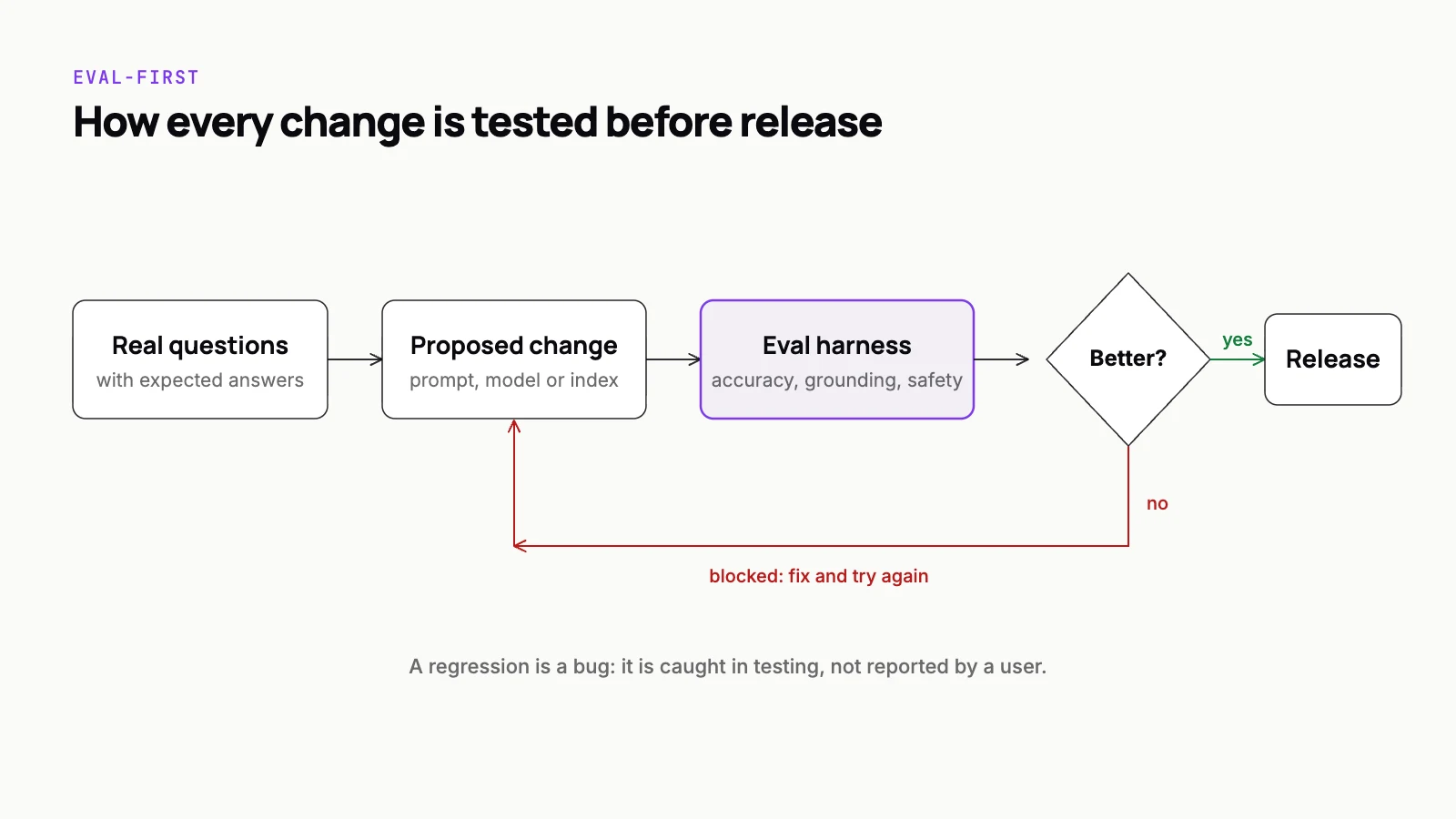
Model output varies between runs, so one clean pass proves little. Run each attack case several times and treat a single success as a failure. Block the release on any canary leak or unauthorised tool call, and review the softer cases by hand. This is the same release discipline as eval-first SI delivery, with attacks in place of ordinary test questions.
Limit what the tools can do
Testing tells you where you stand. Architecture decides how bad a successful injection can be. These controls matter more than any input filter, because they still hold when the model is fooled.
- Enforce authorisation in application code, not in the prompt. The model proposes an action; your code checks the real user's permissions before it runs.
- Give each tool the narrowest scope that works: read-only where possible, credentials tied to the current user, and no access to records that user could not open directly.
- Require human approval for actions that are irreversible or move money, using the patterns in human-in-the-loop approval for SI agents.
- Do not render external images from model output, and restrict links to an allowlist of your own domains. A strict Content Security Policy on the chat page adds a second layer.
- Mark retrieved and third-party content clearly as data in the prompt, separate from instructions. This reduces the risk; it does not remove it.
- Keep secrets, keys and permission rules out of the prompt entirely.
Each restriction costs some convenience, and that trade-off is real. An agent that cannot browse freely or send email without approval looks less impressive in a demo. But if a feature does not need a tool, the simplest and strongest defence is not to give it one.
A short checklist before launch
- Every input channel and every tool is listed, with the roles allowed to use each tool.
- Canary secrets are planted, and the suite fails on any leak.
- Direct and indirect attacks exist for each of the four failure types.
- Assertions check tool calls, arguments and rendered URLs, not refusal wording.
- The suite runs in CI on every prompt, model, tool or renderer change.
- Authorisation is enforced outside the model, and risky actions need human approval.
If your launch is close and the only injection testing so far is a few attempts in a chat window, this list is the place to start. Our SI-driven QA team builds injection suites and wires them into release pipelines, and Octalcode can review an agent's tool permissions before it goes live.