Most mobile teams we talk to are no longer asking whether to add SI to their app. They are asking where it should run, what it will do to the app’s speed and privacy story, and how to stop the model bill growing faster than the user base. Those are the right questions, and they have more to do with mobile engineering than with models.
This is the checklist we work through before writing any code for an SI feature on iOS or Android. It assumes you already have an app people use and want to make one part of it smarter, not rebuild the whole thing around a chatbot.
Start with one job, not a feature list
The weakest SI features are the ones added because a competitor shipped one. The strongest do one job the user already tries to do in your app, faster or with less effort: summarising a long document they just uploaded, filling a form from a photo, answering a question about their own account, or ranking options they are choosing between.
Write that job down as a sentence a user would say. "Tell me what my policy covers for this" is a job. "Add a smart assistant" is not. The sentence decides almost everything that follows: whether the model needs private data, whether it must work offline, and how fast it has to feel.
Should mobile app SI features run on-device or on a server?
Run an SI feature on the device when it must work offline, touches raw camera or microphone data you would rather not upload, or fires on every keystroke; run it on a server when it needs your business data, broad reasoning, or a model you expect to swap. On-device models keep data on the phone and carry no per-request bill, through Core ML and Apple's Foundation Models framework on recent iPhones or LiteRT and Gemini Nano via ML Kit on supported Android devices, but they are small and best at narrow tasks such as classification, extraction, short summaries and smart replies. Server inference offers stronger models, retrieval over your own data and prompt changes without an app release, at the cost of latency and a network dependency. Many apps combine both: a small local model handles the common case instantly and hands harder requests to the server. Never ship a provider API key inside the app bundle; route calls through your own backend.
On-device or server: the core trade-off
Every SI feature on mobile runs in one of two places, or both. On-device inference runs a model on the phone itself. Server inference sends the request to a model you host or call through a provider, and streams the answer back.
On-device has real strengths. Data never leaves the phone, the feature works on a plane, and there is no per-request bill. Both platforms give you a path: Core ML and Apple’s Foundation Models framework on recent iPhones, and LiteRT or Gemini Nano through ML Kit on supported Android devices. The catch is that on-device models are small. They are good at narrow tasks (classification, extraction, short summaries, smart replies) and weak at broad reasoning or anything that needs your company’s data. Support also varies widely across the devices your users actually own.
Server inference gives you the strongest models, your own data through retrieval, and the ability to change prompts and models without shipping an app update. That last point matters more than teams expect. App review and slow update adoption mean anything baked into the binary is hard to fix quickly. The price is latency, a network dependency, and a privacy story you have to tell honestly.
- On device: anything that must work offline, touches raw camera or microphone data you would rather not upload, or runs on every keystroke.
- On the server: anything that needs your business data, broad reasoning, or a model you will want to swap next quarter.
- Both: a small on-device model handles the common case instantly and hands the harder requests to the server.
Never call a model provider straight from the app
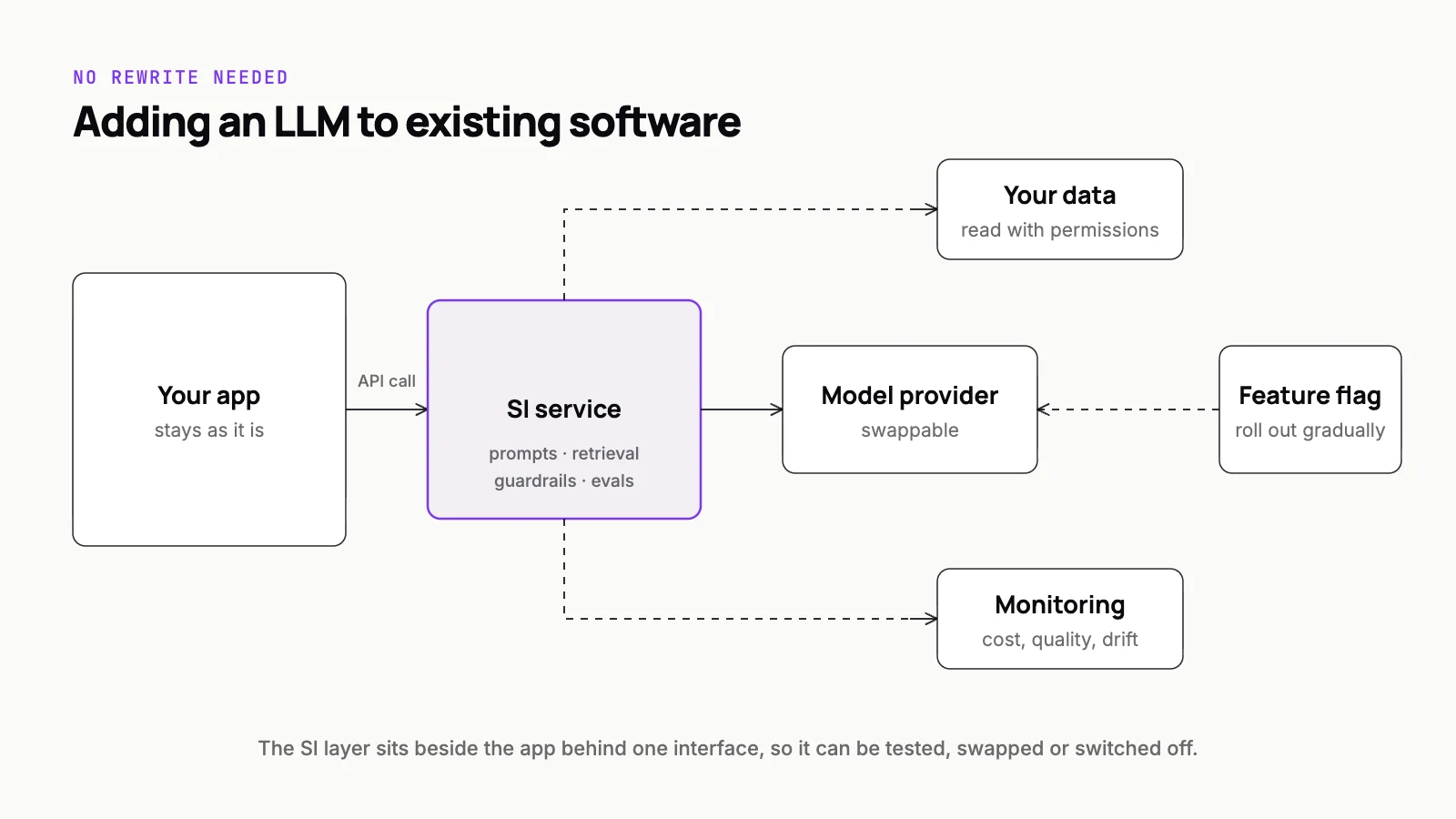
The most common mistake we find in mobile SI code is a model provider’s API key shipped inside the app bundle. Anything in the binary can be extracted, and a leaked key means someone else spends your budget. Put a thin backend between the app and every model. It authenticates the user, holds the keys, applies limits, logs requests, and lets you change the model without a release.
That backend is also where SI meets the rest of your system, and it is the piece of custom software mobile teams most often skip. If the feature needs account data, policy rules or documents, the server fetches them and passes only what the model needs. The patterns in our guide to integrating LLMs into existing software apply to a mobile client exactly as they do to a web one.
Latency: make it feel fast before it is fast
Model responses take longer than a typical API call, and mobile users notice. You will not make a large model answer instantly, so design the wait instead.
- Stream tokens to the screen as they arrive rather than waiting for the full answer.
- Show progress that says what is happening ("reading your document"), not just a spinner.
- Start the request early, for example when the screen opens, if the input is already known.
- Let the user cancel, and cancel the server request too, so you stop paying for an answer nobody will read.
- Cache answers to repeated questions on the device and on the server.
Streaming on mobile has its own traps. Connections drop when the app goes to the background, and the radio switches networks mid-answer. Build for a clean retry or resume from the start, not after the first bug report.
Privacy: decide what leaves the phone
Users trust an app with more personal data than they would type into a website. An SI feature that quietly sends that data to a third-party model breaks that trust, even when it is technically allowed. In a regulated product, such as an insurance app like Oneplan, what leaves the device and where it goes is a design decision, not an implementation detail.
Send the minimum. Strip identifiers the model does not need, and keep sensitive processing on device where a small model can do the job. Choose providers whose terms exclude training on your traffic, and pick a data region that suits your users. Then say so plainly in the app at the moment the feature is used, not only on a policy page.
Cost control is an architecture choice
Server inference is billed per use, so cost grows with engagement, which is the opposite of how most app costs behave. The controls that work are structural, built into the request path, not a budget alarm that fires after the money is spent.
- Per-user and per-feature quotas enforced on your backend, with a friendly message when someone reaches one.
- Route simple requests to a smaller model and reserve the large one for requests that need it.
- Cap response length and the amount of context you send, since both drive cost.
- Cache, deduplicate, and move repetitive work on device.
- Put the heaviest features behind sign-in so anonymous traffic cannot run up the bill.
Log the cost of every request against the user and the feature from day one. When usage takes off, you want to know which feature is driving it before the invoice tells you.
UX patterns that hold up
The best mobile SI features rarely look like a chat window. They sit inside an existing flow: a suggestion under a form field, a summary card above a long document, a ranked list with a short reason beside each item. iNVOC shows the shape well: point a phone at a shelf and get a ranked answer, with the reasoning shown on screen rather than collapsed into one opaque grade.
Users trust a result they can check. Show the reasoning, make the output editable, and never let the model act without the user’s confirmation.
A few rules we follow. Make outputs editable rather than final. Show sources when an answer comes from documents. Give a one-tap way to flag a bad answer, and read those flags. Never let the model take an action (send, pay, submit) the user has not confirmed.
App store review
Both stores review SI features like any other, and a few areas cause most of the friction. Apple expects you to disclose when personal data is shared with third parties and to get the user’s permission first, and its guidelines now spell out that this includes sending data to third-party SI services. Your App Store privacy details and Google Play Data safety form must both reflect data sent to model providers.
Generated output is treated much like user-generated content. Expect to need content filtering, an in-app way to report offensive output (Google Play has a dedicated policy for generative apps that requires it), and an age rating that reflects what the model could produce. Reviewers also test the feature, so give them a demo account where it works, and make sure it fails gracefully on a device or region you do not support.
Offline behaviour
Decide what the feature does with no connection before a user finds out for you. There are three honest options: run a smaller model on device, queue the request and finish it when the connection returns with a clear notice, or hide the feature and explain why. The worst option is a spinner that never ends.
Test it in airplane mode, on a slow network, and with the app killed mid-request. Each of those produces a different failure, and each one will happen to real users in the first week.
Measure before you scale
Treat the SI feature as a product experiment. Before launch, build a small set of real inputs with known good outputs and score every prompt or model change against it. After launch, track whether people use the feature, whether they accept or edit its output, and whether it moves the job it was meant to help. A feature nobody keeps using is cost without value, and the data will tell you early.
We build mobile apps and the server side that makes their SI features safe to ship, from the model gateway to the evals. If you are planning to add SI to an app that already has users, our custom software and mobile team can help you decide what runs where before you commit to an architecture.